

Pass Exam With Full Sureness - Vault-Associate Dumps with 57 Questions
Verified Vault-Associate dumps Q&As - 100% Pass from Lead1Pass
HashiCorp Vault-Associate Exam Syllabus Topics:
| Topic | Details |
|---|---|
| Topic 1 |
|
| Topic 2 |
|
| Topic 3 |
|
| Topic 4 |
|
| Topic 5 |
|
NEW QUESTION # 16
When unsealing Vault, each Shamir unseal key should be entered:
- A. While encrypted with each administrators PGP key
- B. Sequentially from one system that all of the administrators are in front of
- C. By different administrators each connecting from different computers
- D. At the command line in one single command
Answer: C
Explanation:
When unsealing Vault, each Shamir unseal key should be entered by different administrators each connecting from different computers. This is because the Shamir unseal keys are split into shares that are distributed to trusted operators, and no single operator should have access to more than one share. This way, the unseal process requires the cooperation of a quorum of key holders, and enhances the security and availability of Vault. The unseal keys can be entered via multiple mechanisms from multiple client machines, and the process is stateful. The order of the keys does not matter, as long as the threshold number of keys is reached. The unseal keys should not be entered at the command line in one single command, as this would expose them to the history and compromise the security. The unseal keys should not be encrypted with each administrator's PGP key, as this would prevent Vault from decrypting them and reconstructing the master key. Reference: https://developer.hashicorp.com/vault/docs/concepts/seal3, https://developer.hashicorp.com/vault/docs/commands/operator/unseal
NEW QUESTION # 17
An organization wants to authenticate an AWS EC2 virtual machine with Vault to access a dynamic database secret. The only authentication method which they can use in this case is AWS.
- A. True
- B. False
Answer: B
Explanation:
The statement is false. An organization can authenticate an AWS EC2 virtual machine with Vault to access a dynamic database secret using more than one authentication method. The AWS auth method is one of the options, but not the only one. The AWS auth method supports two types of authentication: ec2 and iam. The ec2 type uses the signed EC2 instance identity document to authenticate the EC2 instance. The iam type uses the AWS Signature v4 algorithm to sign a request to the sts:GetCallerIdentity API and authenticate the IAM principal. However, the organization can also use other auth methods that are compatible with EC2 instances, such as AppRole, JWT/OIDC, or Kubernetes. These methods require the EC2 instance to have some sort of identity material, such as a role ID, a secret ID, a JWT token, or a service account token, that can be used to authenticate to Vault. The identity material can be provisioned to the EC2 instance using various mechanisms, such as user data, metadata service, or cloud-init scripts. The choice of the auth method depends on the use case, the security requirements, and the trade-offs between convenience and control. Reference: AWS - Auth Methods | Vault | HashiCorp Developer, AppRole - Auth Methods | Vault | HashiCorp Developer, JWT/OIDC - Auth Methods | Vault | HashiCorp Developer, Kubernetes - Auth Methods | Vault | HashiCorp Developer
NEW QUESTION # 18
Which of the following is a machine-oriented Vault authentication backend?
- A. AppRole
- B. Okta
- C. GitHub
- D. Transit
Answer: A
Explanation:
AppRole is a machine-oriented authentication method that allows machines or applications to authenticate with Vault using a role ID and a secret ID. The role ID is a unique identifier for the application, and the secret ID is a single-use credential that can be delivered to the application securely. AppRole is designed to provide secure introduction of machines and applications to Vault, and to support the principle of least privilege by allowing fine-grained access control policies to be attached to each role1.
Okta, GitHub, and Transit are not machine-oriented authentication methods. Okta and GitHub are user-oriented authentication methods that allow users to authenticate with Vault using their Okta or GitHub credentials23. Transit is not an authentication method at all, but a secrets engine that provides encryption as a service4.
Reference:
AppRole Auth Method | Vault | HashiCorp Developer
Okta Auth Method | Vault | HashiCorp Developer
GitHub Auth Method | Vault | HashiCorp Developer
Transit Secrets Engine | Vault | HashiCorp Developer
NEW QUESTION # 19
Which of the following are replication methods available in Vault Enterprise? Choose two correct answers.
- A. Performance Replication
- B. Cluster sharding
- C. Disaster Recovery Replication
- D. Namespaces
Answer: A,C
Explanation:
The replication methods available in Vault Enterprise are performance replication and disaster recovery replication. These methods allow critical data to be replicated across clusters to support horizontally scaling and disaster recovery workloads.
Performance replication enables a primary cluster to replicate data to one or more secondary clusters, which can handle client requests and improve performance and availability. Performance replication replicates most Vault data, such as secrets, policies, auth methods, and leases, but not tokens. Performance secondaries generate their own tokens and leases, which are not replicated back to the primary. Performance replication also supports filtering, which allows selective replication of data based on namespaces or paths.
Disaster recovery replication enables a primary cluster to replicate data to one or more secondary clusters, which act as standby clusters in case of a failure or outage of the primary. Disaster recovery replication replicates all Vault data, including tokens and leases, and maintains the same configuration and state as the primary. Disaster recovery secondaries do not handle client requests, but they can be promoted to a primary in a disaster recovery scenario. Reference: Replication - Vault Enterprise | Vault | HashiCorp Developer, Performance Replication - Vault Enterprise | Vault | HashiCorp Developer, Disaster Recovery Replication - Vault Enterprise | Vault | HashiCorp Developer
NEW QUESTION # 20
As a best practice, the root token should be stored in which of the following ways?
- A. Should be stored in Vault
- B. Should be revoked and never stored after initial setup
- C. Should be stored in configuration automation tooling
- D. Should be stored in another password safe
Answer: B
Explanation:
The root token is the initial token created when initializing Vault. It has unlimited privileges and can perform any operation in Vault. As a best practice, the root token should be revoked and never stored after initial setup. This is because the root token is a single point of failure and a potential security risk if it is compromised or leaked. Instead of using the root token, Vault operators should create other tokens with appropriate policies and roles that allow them to perform their tasks. If a new root token is needed in an emergency, the vault operator generate-root command can be used to create one on-the-fly with the consent of a quorum of unseal key holders. Reference: Tokens | Vault | HashiCorp Developer, Generate root tokens using unseal keys | Vault | HashiCorp Developer
NEW QUESTION # 21
What environment variable overrides the CLI's default Vault server address?
- A. VAULT _HTTPS_ ADDRESS
- B. VAULT_ADDR
- C. VAULT_HTTP_ADORESS
- D. VAULT_ADDRESS
Answer: C
Explanation:
The environment variable VAULT_ADDR overrides the CLI's default Vault server address. The VAULT_ADDR environment variable specifies the address of the Vault server that is used to communicate with Vault from other applications or processes. By setting this variable, you can avoid hard-coding the Vault server address in your code or configuration files, and you can also use different addresses for different environments or scenarios. For example, you can use a local development server for testing purposes, and a production server for deploying your application. Reference: Commands (CLI) | Vault | HashiCorp Developer, Vault Agent - secrets as environment variables | Vault | HashiCorp Developer
NEW QUESTION # 22
How would you describe the value of using the Vault transit secrets engine?
- A. The transit secrets engine ensures encryption in-transit and at-rest is enforced enterprise wide
- B. The transit secrets engine relieves the burden of proper encryption/decryption from application developers and pushes the burden onto the operators of Vault
- C. Encryption for application data is best handled by a storage system or database engine, while storing encryption keys in Vault
- D. Vault has an API that can be programmatically consumed by applications
Answer: B
Explanation:
The transit secrets engine relieves the burden of proper encryption/decryption from application developers and pushes the burden onto the operators of Vault. The transit secrets engine provides encryption as a service, which means that it performs cryptographic operations on data in-transit without storing any data. This allows developers to delegate the responsibility of managing encryption keys and algorithms to Vault operators, who can define and enforce policies on the transit secrets engine. This way, developers can focus on their application logic and data, while Vault handles the encryption and decryption of data in a secure and scalable manner. Reference: Transit - Secrets Engines | Vault | HashiCorp Developer, Encryption as a service: transit secrets engine | Vault | HashiCorp Developer
NEW QUESTION # 23
An organization would like to use a scheduler to track & revoke access granted to a job (by Vault) at completion. What auth-associated Vault object should be tracked to enable this behavior?
- A. Lease ID
- B. Token ID
- C. Authentication method
- D. Token accessor
Answer: A
Explanation:
A lease ID is a unique identifier that is assigned by Vault to every dynamic secret and service type authentication token. A lease ID contains information such as the secret path, the secret version, the secret type, etc. A lease ID can be used to track and revoke access granted to a job by Vault at completion, as it allows the scheduler to perform the following operations:
Lookup the lease information by using the vault lease lookup command or the sys/leases/lookup API endpoint. This will return the metadata of the lease, such as the expire time, the issue time, the renewable status, and the TTL.
Renew the lease if needed by using the vault lease renew command or the sys/leases/renew API endpoint. This will extend the validity of the secret or the token for a specified increment, or reset the TTL to the original value if no increment is given.
Revoke the lease when the job is completed by using the vault lease revoke command or the sys/leases/revoke API endpoint. This will invalidate the secret or the token immediately and prevent any further renewals. For example, with the AWS secrets engine, the access keys will be deleted from AWS the moment a lease is revoked.
A lease ID is different from a token ID or a token accessor. A token ID is the actual value of the token that is used to authenticate to Vault and perform requests. A token ID should be treated as a secret and protected from unauthorized access. A token accessor is a secondary identifier of the token that is used for token management without revealing the token ID. A token accessor can be used to lookup, renew, or revoke a token, but not to authenticate to Vault or access secrets. A token ID or a token accessor can be used to revoke the token itself, but not the leases associated with the token. To revoke the leases, a lease ID is required.
An authentication method is a way to verify the identity of a user or a machine and issue a token with appropriate policies and metadata. An authentication method is not an object that can be tracked or revoked, but a configuration that can be enabled, disabled, tuned, or customized by using the vault auth commands or the sys/auth API endpoints.
NEW QUESTION # 24
When creating a policy, an error was thrown: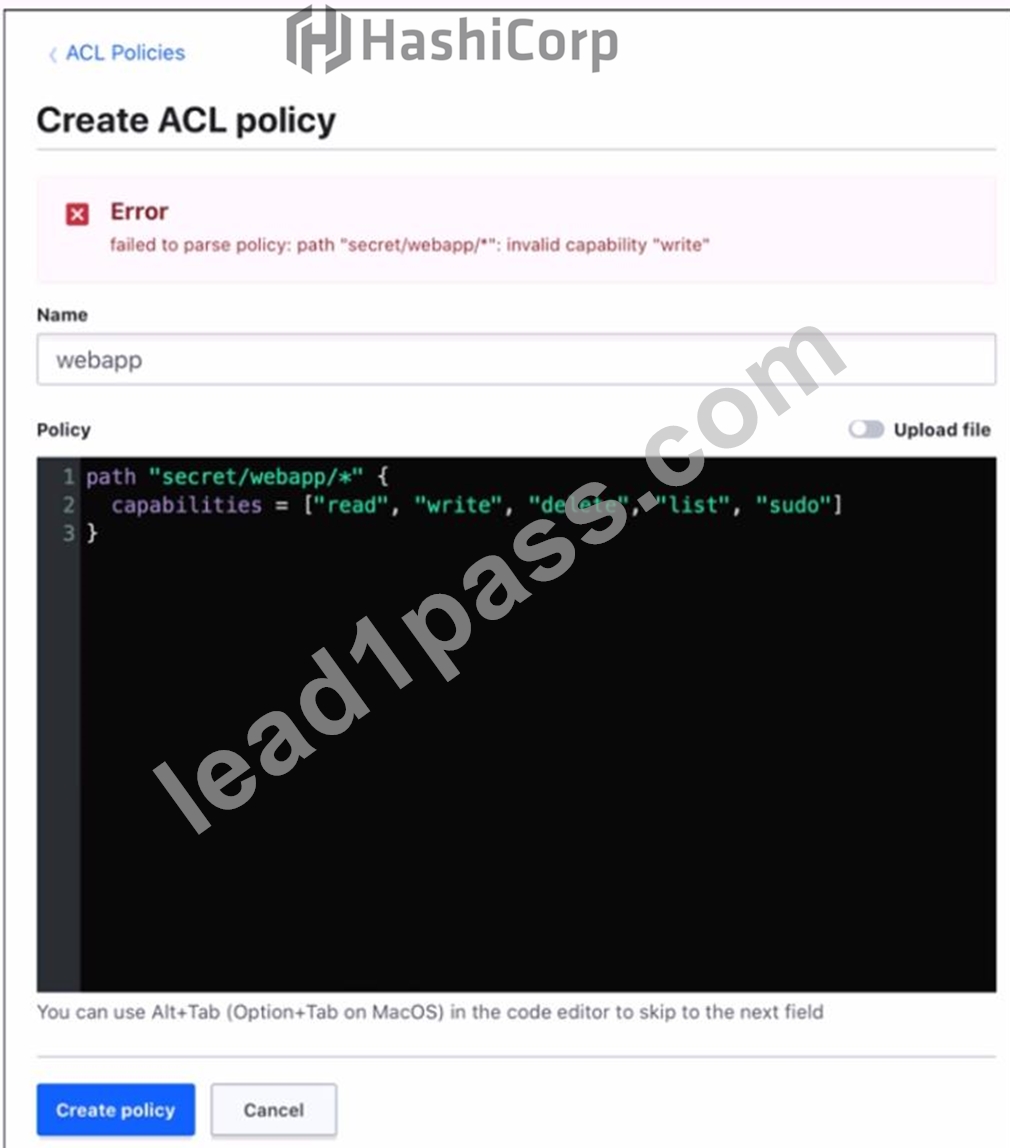
Which statement describes the fix for this issue?
- A. sudo is not a capability
- B. You cannot have a wildcard (" * ") in the path
- C. Replace write with create in the capabilities list
Answer: C
Explanation:
The error was thrown because the policy code contains an invalid capability, "write". The valid capabilities for a policy are "create", "read", "update", "delete", "list", and "sudo". The "write" capability is not recognized by Vault and should be replaced with "create", which allows creating new secrets or overwriting existing ones. The other statements are not correct, because the wildcard (*) and the sudo capability are both valid in a policy. The wildcard matches any number of characters within a path segment, and the sudo capability allows performing certain operations that require root privileges.
Reference:
[Policy Syntax | Vault | HashiCorp Developer]
[Policy Syntax | Vault | HashiCorp Developer]
NEW QUESTION # 25
Which of the following statements describe the CLI command below?
S vault login -method-1dap username-mitche11h
- A. Generates a token which is response wrapped
- B. You will be prompted to enter the password
- C. By default the generated token is valid for 24 hours
- D. Fails because the password is not provided
Answer: A
Explanation:
The CLI command vault login -method ldap username=mitchellh generates a token that is response wrapped. This means that the token contains a base64-encoded response wrapper, which is a JSON object that contains information about the token, such as its policies, metadata, and expiration time. The response wrapper is used to verify the authenticity and integrity of the token, and to prevent replay attacks. The response wrapper also allows Vault to automatically renew the token when it expires, or to revoke it if it is compromised. The -method ldap option specifies that the authentication method is LDAP, which requires a username and password to be provided. The username mitchellh is an example of an LDAP user name, and the password will be hidden when entered. Reference: Vault CLI Reference | Vault | HashiCorp Developer, Vault CLI Reference | Vault | HashiCorp Developer
NEW QUESTION # 26
To give a role the ability to display or output all of the end points under the /secrets/apps/* end point it would need to have which capability set?
- A. read
- B. update
- C. list
- D. sudo
- E. None of the above
Answer: D
Explanation:
To give a role the ability to display or output all of the end points under the /secrets/apps/* end point, it would need to have the list capability set. The list capability allows a role to perform any operation on any path in Vault, including reading, writing, deleting, and listing. The list capability is required for roles that need to access sensitive data or perform administrative tasks in Vault. The other capabilities are not relevant for this scenario, as they only allow specific operations on specific paths or secrets engines. Reference: Policies | Vault | HashiCorp Developer, token capabilities - Command | Vault | HashiCorp Developer
NEW QUESTION # 27
Which of these is not a benefit of dynamic secrets?
- A. Minimizes damage of credentials leaking
- B. Ensures that administrators can see every password used
- C. Replaces cumbersome password rotation tools and practices
- D. Supports systems which do not natively provide a method of expiring credentials
Answer: B
Explanation:
Dynamic secrets are generated on-demand by Vault and have a limited time-to-live (TTL). They do not ensure that administrators can see every password used, as they are often encrypted and ephemeral. The benefits of dynamic secrets are:
They support systems that do not natively provide a method of expiring credentials, such as databases, cloud providers, SSH, etc. Vault can revoke the credentials when they are no longer needed or when the lease expires.
They minimize the damage of credentials leaking, as they are short-lived and can be easily rotated or revoked. If a credential is compromised, the attacker has a limited window of opportunity to use it before it becomes invalid.
They replace cumbersome password rotation tools and practices, as Vault can handle the generation and revocation of credentials automatically and securely. This reduces the operational overhead and complexity of managing secrets.
NEW QUESTION # 28
You are performing a high number of authentications in a short amount of time. You're experiencing slow throughput for token generation. How would you solve this problem?
- A. Establish a rate limit quota
- B. Implement batch tokens
- C. Increase the time-to-live on service tokens
- D. Reduce the number of policies attached to the tokens
Answer: B
Explanation:
Batch tokens are a type of tokens that are not persisted in Vault's storage backend, but are encrypted blobs that carry enough information to perform Vault actions. Batch tokens are extremely lightweight and scalable, and can improve the throughput for token generation. Batch tokens are suitable for high-volume and ephemeral workloads, such as containers or serverless functions, that require short-lived and non-renewable tokens. Batch tokens can be created by using the -type=batch flag in the vault token create command, or by configuring the token_type parameter in the auth method's role or mount options. Batch tokens have some limitations compared to service tokens, such as the lack of renewal, revocation, listing, accessor, and cubbyhole features. Therefore, batch tokens should be used with caution and only when the trade-offs are acceptable. Reference: https://developer.hashicorp.com/vault/tutorials/tokens/batch-tokens1, https://developer.hashicorp.com/vault/docs/commands/token/create2, https://developer.hashicorp.com/vault/docs/concepts/tokens#token-types3
NEW QUESTION # 29
Examine the command below. Output has been trimmed.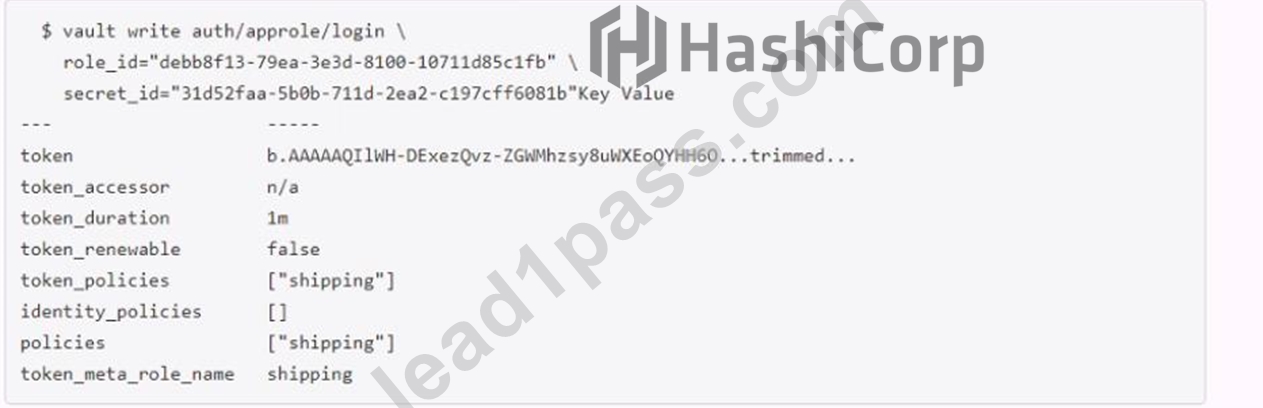
Which of the following statements describe the command and its output?
- A. Generated token's TTL is 60 hours
- B. Generated token is an orphan token which can be renewed indefinitely
- C. Missing a default token policy
- D. Configures the AppRole auth method with user specified role ID and secret ID
Answer: A,B
Explanation:
The command shown in the image is:
vault token create -policy=approle -orphan -period=60h
This command creates a new token with the following characteristics:
It has the policy "approle" attached to it, which grants or denies access to certain paths and operations in Vault according to the policy rules. The policy can be defined by using the vault policy write command or the sys/policy API endpoint12.
It is an orphan token, which means it has no parent token and it will not be revoked when its parent token is revoked. Orphan tokens can be useful for creating long-lived tokens that are not affected by the token hierarchy3.
It has a period of 60 hours, which means it has a renewable TTL of 60 hours. This means that the token can be renewed indefinitely as long as it does not go past the 60-hour mark from the last renewal time. The token's TTL will be reset to 60 hours upon each renewal. Periodic tokens are useful for creating tokens that have a fixed lifetime and can be easily revoked4.
NEW QUESTION # 30
The vault lease renew command increments the lease time from:
- A. The current time
- B. The end of the lease
Answer: A
Explanation:
The vault lease renew command increments the lease time from the current time, not the end of the lease. This means that the user can request a specific amount of time they want remaining on the lease, termed the increment. This is not an increment at the end of the current TTL; it is an increment from the current time. For example, vault lease renew -increment=3600 my-lease-id would request that the TTL of the lease be adjusted to 1 hour (3600 seconds) from now. Having the increment be rooted at the current time instead of the end of the lease makes it easy for users to reduce the length of leases if they don't actually need credentials for the full possible lease period, allowing those credentials to expire sooner and resources to be cleaned up earlier. The requested increment is completely advisory. The backend in charge of the secret can choose to completely ignore it1. Reference:
Lease, Renew, and Revoke | Vault | HashiCorp Developer
NEW QUESTION # 31
Which statement describes the results of this command: $ vault secrets enable transit
- A. Fails due to missing -path parameter
- B. Enables the transit secrets engine at secret path
- C. Enables the transit secrets engine at transit path
- D. Fails because the transit secrets engine is enabled by default
- E. Requires a root token to execute the command successfully
Answer: C
Explanation:
The command vault secrets enable transit enables the transit secrets engine at the transit path. The transit secrets engine is a secrets engine that handles cryptographic functions on data in-transit, such as encryption, decryption, signing, verification, hashing, and random bytes generation. The transit secrets engine does not store the data sent to it, but only performs the requested operations and returns the results. The transit secrets engine can also be viewed as "cryptography as a service" or "encryption as a service". The command vault secrets enable transit uses the default path of transit for the secrets engine, but this can be changed by using the -path option. For example, vault secrets enable -path=my-transit transit would enable the transit secrets engine at the my-transit path. Reference: Transit - Secrets Engines | Vault | HashiCorp Developer, vault secrets enable - Command | Vault | HashiCorp Developer
NEW QUESTION # 32
Where do you define the Namespace to log into using the Vault Ul?
To answer this question
Use your mouse to click on the screenshot in the location described above. An arrow indicator will mark where you have clicked. Click the "Answer" button once you have positioned the arrow to answer the question. You may need to scroll down to see the entire screenshot.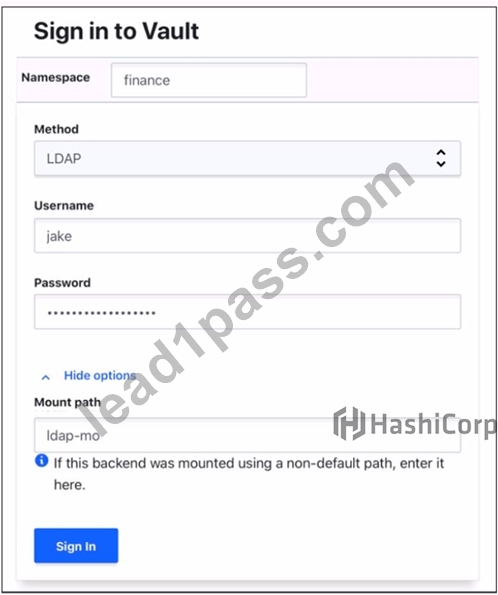
Answer:
Explanation: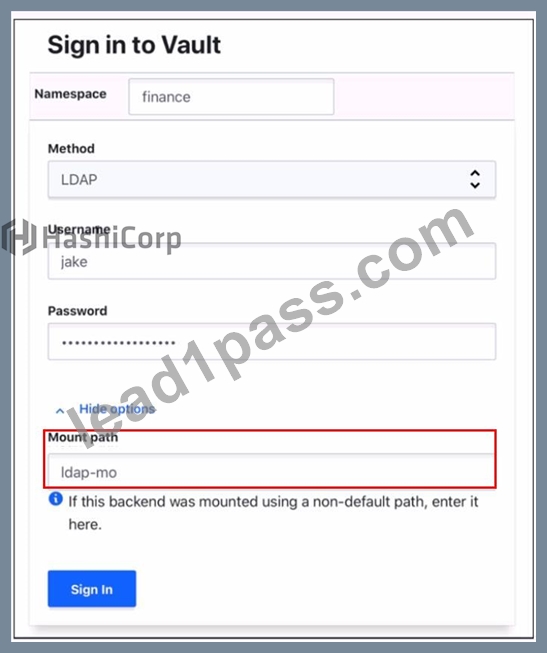
NEW QUESTION # 33
Which of the following vault lease operations uses a lease _ id as an argument? Choose two correct answers.
- A. describe
- B. create
- C. renew
- D. revoke -prefix
- E. revoke
Answer: C,E
Explanation:
The vault lease operations that use a lease_id as an argument are renew and revoke. The renew operation allows a client to extend the validity of a lease associated with a secret or a token. The revoke operation allows a client to terminate a lease immediately and invalidate the secret or the token. Both operations require a lease_id as an argument to identify the lease to be renewed or revoked. The lease_id can be obtained from the response of reading a secret or creating a token, or from the vault lease list command. The other operations, revoke-prefix, create, and describe, do not use a lease_id as an argument. The revoke-prefix operation allows a client to revoke all secrets or tokens generated under a given prefix. The create operation allows a client to create a new lease for a secret. The describe operation allows a client to view information about a lease, such as its TTL, policies, and metadata. Reference: Lease, Renew, and Revoke | Vault | HashiCorp Developer, vault lease - Command | Vault | HashiCorp Developer
NEW QUESTION # 34
What are orphan tokens?
- A. Orphan tokens are tokens with a use limit so you can set the number of uses when you create them
- B. Orphan tokens do not expire when their own max TTL is reached
- C. Orphan tokens are not children of their parent; therefore, orphan tokens do not expire when their parent does
- D. Orphan tokens are tokens with no policies attached
Answer: B
Explanation:
Orphan tokens are tokens that are root of their own token tree. This means that they do not have any parent token associated with them, and they do not expire when their parent token expires. Orphan tokens are useful for scenarios where you need a short-lived and independent token, such as for testing or debugging purposes. Orphan tokens can also be used to create temporary access tokens for applications or services that need to communicate with Vault without using a long-lived root token. Reference: Tokens | Vault | HashiCorp Developer, Vault cli: how to create orphan token with role - HashiCorp Discuss
NEW QUESTION # 35
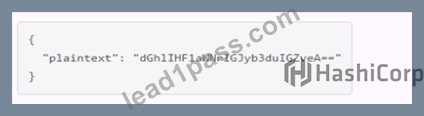
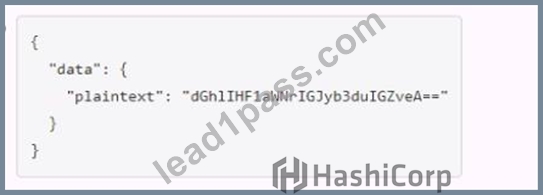
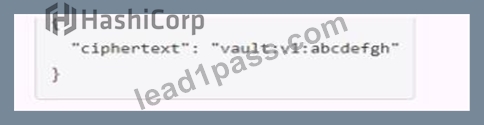
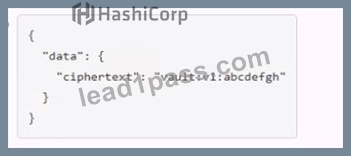
A user issues the following cURL command to encrypt data using the transit engine and the Vault AP:
Which payload.json file has the correct contents?
- A.
- B.
- C.
- D.
Answer: B
Explanation:
The payload.json file that has the correct contents is C. This file contains a JSON object with a single key, "plaintext", and a value that is the base64-encoded string of the data to be encrypted. This is the format that the Vault API expects for the transit encrypt endpoint1. The other files are not correct because they either have the wrong key name, the wrong value format, or the wrong JSON syntax.
Reference:
Encrypt Data - Transit Secrets Engine | Vault | HashiCorp Developer
NEW QUESTION # 36
When looking at Vault token details, which key helps you find the paths the token is able to access?
- A. Accessor
- B. Policies
- C. Meta
- D. Path
Answer: B
Explanation:
When looking at Vault token details, the policies key helps you find the paths the token is able to access. Policies are a declarative way to grant or forbid access to certain paths and operations in Vault. Policies are written in HCL or JSON and are attached to tokens by name. Policies are deny by default, so an empty policy grants no permission in the system. A token can have one or more policies associated with it, and the effective policy is the union of all the individual policies. You can view the token details by using the vault token lookup command or the auth/token/lookup API endpoint. The output will show the policies key with a list of policy names that are attached to the token. You can also view the contents of a policy by using the vault policy read command or the sys/policy API endpoint. The output will show the rules key with the HCL or JSON representation of the policy. The rules will specify the paths and the capabilities (such as create, read, update, delete, list, etc.) that the policy allows or denies. Reference: https://developer.hashicorp.com/vault/docs/concepts/policies4, https://developer.hashicorp.com/vault/docs/commands/token/lookup5, https://developer.hashicorp.com/vault/api-docs/auth/token#lookup-a-token6, https://developer.hashicorp.com/vault/docs/commands/policy/read7, https://developer.hashicorp.com/vault/api-docs/system/policy8
NEW QUESTION # 37
Which of the following statements are true about Vault policies? Choose two correct answers.
- A. The default policy can not be modified
- B. Policies provide a declarative way to grant or forbid access to certain paths and operations in Vault
- C. Vault must be restarted in order for a policy change to take an effect
- D. You must use YAML to define policies
- E. Policies deny by default (empty policy grants no permission)
Answer: B,E
Explanation:
Vault policies are written in HCL or JSON format and are attached to tokens or roles by name. Policies define the permissions and restrictions for accessing and performing operations on certain paths and secrets in Vault. Policies are deny by default, which means that an empty policy grants no permission in the system, and any request that is not explicitly allowed by a policy is implicitly denied1. Some of the features and benefits of Vault policies are:
Policies are path-based, which means that they match the request path to a set of rules that specify the allowed or denied capabilities, such as create, read, update, delete, list, sudo, etc2.
Policies are additive, which means that if a token or a role has multiple policies attached, the effective policy is the union of all the individual policies. The most permissive capability is granted if there is a conflict3.
Policies can use glob patterns, such as * and +, to match multiple paths or segments with a single rule. For example, path "secret/*" matches any path starting with secret/, and path "secret/+/config" matches any path with two segments after secret/ and ending with config4.
Policies can use templating to interpolate certain values into the rules, such as identity information, time, randomness, etc. For example, path "secret/{{identity.entity.id}}/*" matches any path starting with secret/ followed by the entity ID of the requester5.
Policies can be managed by using the vault policy commands or the sys/policy API endpoints. You can write, read, list, and delete policies by using these interfaces6.
The default policy is a built-in policy that is attached to all tokens by default and cannot be deleted. However, the default policy can be modified by using the vault policy write command or the sys/policy API endpoint. The default policy provides common permissions for tokens, such as renewing themselves, looking up their own information, creating and managing response-wrapping tokens, etc7.
You do not have to use YAML to define policies, as Vault supports both HCL and JSON formats. HCL is a human-friendly configuration language that is also JSON compatible, which means that JSON can be used as a valid input for policies as well8.
Vault does not need to be restarted in order for a policy change to take effect, as policies are stored and evaluated in memory. Any change to a policy is immediately reflected in the system, and any token or role that has that policy attached will be affected by the change.
NEW QUESTION # 38
Your DevOps team would like to provision VMs in GCP via a CICD pipeline. They would like to integrate Vault to protect the credentials used by the tool. Which secrets engine would you recommend?
- A. Identity secrets engine
- B. Key/Value secrets engine version 2
- C. Google Cloud Secrets Engine
- D. SSH secrets engine
Answer: C
Explanation:
The Google Cloud Secrets Engine is the best option for the DevOps team to provision VMs in GCP via a CICD pipeline and integrate Vault to protect the credentials used by the tool. The Google Cloud Secrets Engine can dynamically generate GCP service account keys or OAuth tokens based on IAM policies, which can be used to authenticate and authorize the CICD tool to access GCP resources. The credentials are automatically revoked when they are no longer used or when the lease expires, ensuring that the credentials are short-lived and secure. The DevOps team can configure rolesets or static accounts in Vault to define the scope and permissions of the credentials, and use the Vault API or CLI to request credentials on demand. The Google Cloud Secrets Engine also supports generating access tokens for impersonated service accounts, which can be useful for delegating access to other service accounts without storing or managing their keys1.
The Identity Secrets Engine is not a good option for this use case, because it does not generate GCP credentials, but rather generates identity tokens that can be used to access other Vault secrets engines or namespaces2. The Key/Value Secrets Engine version 2 is also not a good option, because it does not generate dynamic credentials, but rather stores and manages static secrets that the user provides3. The SSH Secrets Engine is not a good option either, because it does not generate GCP credentials, but rather generates SSH keys or OTPs that can be used to access remote hosts via SSH4.
Reference:
Google Cloud - Secrets Engines | Vault | HashiCorp Developer
Identity - Secrets Engines | Vault | HashiCorp Developer
KV - Secrets Engines | Vault | HashiCorp Developer
SSH - Secrets Engines | Vault | HashiCorp Developer
NEW QUESTION # 39
......
Vault-Associate Dumps Full Questions - Exam Study Guide: https://www.lead1pass.com/HashiCorp/Vault-Associate-practice-exam-dumps.html
Pass Vault-Associate Exam in First Attempt Guaranteed 2024 Dumps: https://drive.google.com/open?id=1vqmqiyoxTE-LiyLeJGOLjamUoVH5FBce