

[Jan-2026] CompTIA 220-1202 Actual Questions and Braindumps
Pass 220-1202 Exam with Updated 220-1202 Exam Dumps PDF 2026
NEW QUESTION # 87
The screen of a previously working computer repeatedly displays an OS Not Found error message when the computer is started. Only a USB drive, a keyboard, and a mouse are plugged into the computer. Which of the following should a technician do first?
- A. Run data recovery tools on the disk
- B. Partition the disk using the GPT format
- C. Check boot options
- D. Switch from UEFI to BIOS
Answer: C
Explanation:
Comprehensive and Detailed Explanation From Exact Extract:
An "OS Not Found" error typically indicates that the computer is attempting to boot from a drive that doesn't contain a valid operating system or bootable partition. The presence of a USB drive might be confusing the boot order. Therefore, the first step a technician should take is to verify and adjust the boot sequence in the system's firmware (BIOS or UEFI). It's possible that the USB drive is being prioritized over the internal hard drive, which may cause the system to miss the OS entirely.
A: Running data recovery tools is premature before confirming boot order.
B: Repartitioning the disk would destroy existing data-this should not be done until confirmed the OS is actually missing.
D: Switching between UEFI and BIOS (legacy mode) might help in rare cases, but it is not the first step in standard OS boot issue troubleshooting.
Reference:
CompTIA A+ 220-1102 Objective 1.7: Troubleshoot common operating system problems.
Study Guide Section: Boot process and boot order configuration.
NEW QUESTION # 88
A small office reported a phishing attack that resulted in a malware infection. A technician is investigating the incident and has verified the following:
# All endpoints are updated and have the newest EDR signatures.
# Logs confirm that the malware was quarantined by EDR on one system.
# The potentially infected machine was reimaged.
Which of the following actions should the technician take next?
- A. Suggest alternate preventative controls that would include more advanced security software
- B. Flash the firmware of the router to ensure the integrity of network traffic
- C. Discuss the cause of the issue and educate the end user about security hygiene
- D. Install network security tools to prevent downloading infected files from the internet
Answer: C
Explanation:
Comprehensive and Detailed Explanation From Exact Extract:
After containment and remediation, one of the final steps in incident response is user education. Since the root cause was a phishing attack, it is essential to educate users about identifying phishing attempts, safe browsing practices, and how to handle suspicious communications. This improves overall security posture and helps prevent future incidents.
A: Installing additional tools may be helpful but is a long-term step.
C: Flashing router firmware is not warranted unless the network hardware is known to be compromised.
D: Suggesting more advanced tools might be excessive given that the EDR successfully contained the incident.
Reference:
CompTIA A+ 220-1102 Objective 2.5: Given a scenario, detect, remove, and prevent malware using appropriate tools and methods.
Study Guide Section: Incident response and user education after a security event
NEW QUESTION # 89
A user logs in daily and cannot print a report. Help desk fixes it each day, but the issue recurs. What should be done so the issue doesn't recur? (Select two)
- A. Set the print spooler to have no dependencies
- B. Set the print spooler to Automatic
- C. Start the printer extensions and notifications service
- D. Set the print spooler recovery to take no action
- E. Start the print spooler service
- F. Set the print spooler log-on to the user's account
Answer: B,E
Explanation:
Comprehensive and Detailed Explanation From Exact Extract:
For persistent printing issues due to spooler service, ensure theprint spooler is started and set to Automatic.
This maintains print capability across reboots.
FromMike Meyers' Lab Manual:
"If users lose printing capabilities on reboot, the print spooler service must be configured to start automatically and be confirmed as running."
NEW QUESTION # 90
A security administrator teaches all of an organization's staff members to use BitLocker To Go. Which of the following best describes the reason for this training?
- A. To ensure that all removable media is password protected in case of loss or theft
- B. To enable Secure Boot and a BIOS-level password to prevent configuration changes
- C. To configure all laptops to use the TPM as an encryption factor for hard drives
- D. To enforce VPN connectivity to be encrypted by hardware modules
Answer: A
Explanation:
Comprehensive and Detailed Explanation From Exact Extract:
BitLocker To Go is a Microsoft encryption feature specifically designed for removable drives such as USB flash drives and external hard drives. It allows users to protect the data on these devices by requiring a password to decrypt the contents, thereby preventing unauthorized access in the event the device is lost or stolen.
A is correct because BitLocker To Go is directly tied to password-protecting removable media.
B and C are unrelated to BitLocker To Go; Secure Boot and VPN encryption are entirely different security layers.
D applies to BitLocker (not BitLocker To Go) and full disk encryption on internal drives using TPM.
Reference:
CompTIA A+ 220-1102 Objective 2.2: Compare and contrast common security measures and tools.
Study Guide Section: Encryption technologies (BitLocker, BitLocker To Go)
NEW QUESTION # 91
An employee is trying to connect their company laptop to airport Wi-Fi. A pop-up with the airport logo appeared and was closed quickly. The internet does not work. What should a help desk technician suggest?
- A. Look for a wall socket with RJ45 and try to connect
- B. Reconnect to the network and read the pop-up carefully
- C. Contact the airport IT department
- D. Tell the employee that company policy prohibits connection to public Wi-Fi
Answer: B
Explanation:
Comprehensive and Detailed Explanation From Exact Extract:
Public Wi-Fi networks often usecaptive portals, which require accepting terms or authenticating via the pop- up page before full access is granted. Closing it prematurely stops full connection.
FromTravis Everett - All-in-One Exam Guide:
"Captive portals intercept the first HTTP request and present a login or acknowledgment screen. Without completing it, access is denied."
NEW QUESTION # 92
A help desk team was alerted that a company-owned cell phone has an unrecognized password-cracking application. Which of the following should the help desk team do to prevent further unauthorized installations from occurring?
- A. Install anti-malware software.
- B. Deploy MDM.
- C. Configure Group Policy.
- D. Implement PAM.
Answer: B
Explanation:
Comprehensive and Detailed Explanation From Exact Extract:
Mobile Device Management (MDM) is used to control, monitor, and enforce policies on mobile devices. It allows IT teams to restrict app installations, push approved apps, and monitor device compliance. Deploying MDM would prevent unauthorized applications, such as password crackers, from being installed on company- managed devices.
A: Group Policy is for managing Windows environments and not applicable to smartphones.
B: PAM (Privileged Access Management) controls administrative access, not app installation.
C: Anti-malware can help detect malicious apps but doesn't prevent their installation proactively.
Reference:
CompTIA A+ 220-1102 Objective 2.2: Compare and contrast common security measures and tools.
Study Guide Section: Mobile Device Management (MDM) capabilities - app control, security enforcement
NEW QUESTION # 93
Which of the following is used to store passwords in macOS?
- A. FileVault
- B. Accessibility
- C. Mission Control
- D. Keychain
Answer: D
Explanation:
Comprehensive and Detailed Explanation From Exact Extract:
Keychainis the built-in macOS utility that manages and stores credentials, including passwords and certificates.
According toQuentin Docter - CompTIA A+ Complete Study Guide:
"Keychain Access in macOS is used for managing and storing passwords securely, similar to credential managers in Windows."
NEW QUESTION # 94
An administrator must rename the administrator account on a Windows desktop. Which tool is best for this?
- A. lusrmgr.msc
- B. gpedit.msc
- C. devmgmt.msc
- D. eventvwr.msc
Answer: A
Explanation:
TheLocal Users and Groups Manager (lusrmgr.msc)is the utility for managing user accounts, including renaming the default Administrator.
FromQuentin Docter - Complete Study Guide:
"The lusrmgr.msc snap-in allows renaming and managing local user accounts, including the default administrator." .
NEW QUESTION # 95
A technician needs to configure laptops so that only administrators can enable virtualization technology if needed. Which of the following should the technician configure?
- A. BIOS password
- B. AutoRun setting
- C. Guest account
- D. Screen lock
Answer: A
Explanation:
Comprehensive and Detailed Explanation From Exact Extract:
Virtualization settings are typically found within the BIOS/UEFI firmware configuration. To prevent unauthorized users from changing these settings, the technician should set a BIOS password. This ensures only administrators with the password can access or modify BIOS settings, including virtualization support.
B: The guest account is a user-level feature in Windows and doesn't control BIOS access.
C: A screen lock prevents casual access to the desktop but doesn't protect firmware settings.
D: AutoRun controls how media and devices behave when inserted - unrelated to BIOS security.
Reference:
CompTIA A+ 220-1102 Objective 2.2: Compare and contrast security measures and administrative controls.
Study Guide Section: BIOS/UEFI settings protection - password implementation
-
NEW QUESTION # 96
A technician is assigned to offboard a user. Which of the following are common tasks on an offboarding checklist? (Choose two.)
- A. Turn off the network ports underneath the user's desk.
- B. Suspend the user's email account.
- C. Quarantine the hard drive in the user's laptop.
- D. Deactivate the user's key fobs for door access.
- E. Add the MAC address of the user's computer to a blocklist.
- F. Purge all PII associated with the user.
Answer: B,D
Explanation:
Comprehensive and Detailed Explanation From Exact Extract:
User offboarding involves disabling the departing user's access to company systems and facilities. Two key tasks typically include:
* Deactivating physical access credentials (e.g., key fobs or badges) to prevent unauthorized entry (B).
* Suspending or disabling the user's email account to prevent future use and to retain business communications (D).
A: Quarantining a hard drive is not standard unless malware or legal issues are involved.
C: Purging PII must follow legal retention policies; it's not typically an immediate offboarding task.
E: Disabling network ports may be relevant in some cases but is not a standard offboarding step.
F: Blocking MAC addresses is not typical unless the device is considered a security threat.
Reference:
CompTIA A+ 220-1102 Objective 4.1: Given a scenario, implement proper documentation and offboarding procedures.
Study Guide Section: User lifecycle management - onboarding and offboarding tasks
NEW QUESTION # 97
Performance on a user's smartphone is degrading. Applications take a long time to start, and switching between windows also takes a long time. Which of the following diagnostic steps should a mobile technician take first?
- A. Check the phone's battery state
- B. Restore the phone to factory settings
- C. Uninstall unneeded applications
- D. Restart the phone
Answer: D
Explanation:
Comprehensive and Detailed Explanation From Exact Extract:
Thefirst stepin troubleshooting degraded mobile performance is typically arestart. This clears RAM and stops background processes that might be causing issues.
FromAll-in-One Exam Guide:
"Before taking invasive measures like a factory reset, always restart the device. A reboot clears temporary files and can significantly improve responsiveness."
NEW QUESTION # 98
You have been contacted through the help desk chat application. A user is setting up a replacement SOHO router. Assist the user with setting up the router.
INSTRUCTIONS
Select the most appropriate statement for each response. Click the send button after each response to continue the chat.
If at any time you would like to bring back the initial state of the simulation, please click the Reset All button.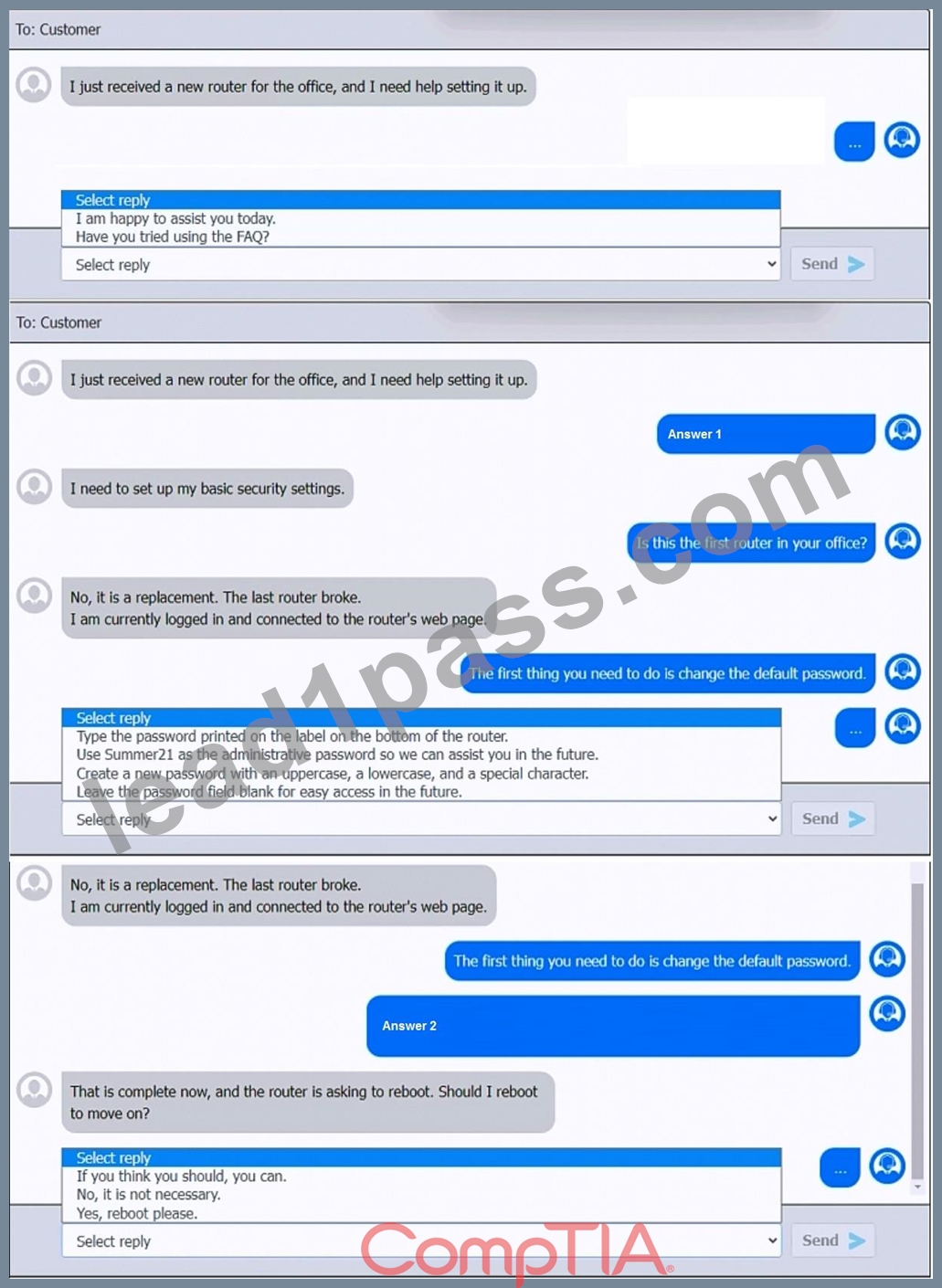
Answer:
Explanation:
See explanation below.
Explanation:
First Chat Response:When the user mentions setting up a new router, the best initial response to maintain a helpful and professional tone is:
>Select reply:"I am happy to assist you today."
Second Chat Response:When the user states that they need to set up basic security settings:
>Select reply:"Is this the first router in your office?"
Third Chat Response:After learning it's a replacement router and the user is logged into the router's web page:
>Select reply:"The first thing you need to do is change the default password." Fourth Chat Response:For the response about password settings:
>Select reply:"Create a new password with an uppercase, a lowercase, and a special character." Fifth Chat Response:When the router prompts to reboot:
>Select reply:"Yes, reboot please."
Study Guide Reference: The CompTIA A+ Core 2 guide highlights the importance of changing default credentials and using strong password policies, particularly in SOHO environments where routers are often targeted.
NEW QUESTION # 99
A technician follows proper malware removal procedures but cannot remove all malware. They decide to reload the OS. What should they select?
- A. System restore
- B. Version upgrade
- C. OS repair
- D. Clean install
Answer: D
Explanation:
Aclean installensures all malware is eliminated by completely wiping and reinstalling the OS. System restore or repair may leave traces.
FromQUENTIN DOCTER - COMPTIA A+ COMPLETE study GUIDE:
"If malware cannot be completely removed, perform a clean installation of the operating system. This ensures no remnants remain on the machine."
NEW QUESTION # 100
A technician verifies that a malware incident occurred on some computers in a small office. Which of the following should the technician do next?
- A. Update the anti-malware and scan the computers
- B. Disable System Restore
- C. Quarantine the infected systems
- D. Educate the end users
Answer: C
Explanation:
Comprehensive and Detailed Explanation From Exact Extract:
Once a malware incident has been confirmed, the immediate next step is to contain the threat. Quarantining infected systems prevents the malware from spreading to other devices and isolates the malicious code for further analysis or remediation.
B: Educating end users is important but occurs later in the incident response process.
C: Disabling System Restore is part of cleanup, not containment.
D: Updating and scanning should occur after the system is quarantined to prevent further infection or spread.
Reference:
CompTIA A+ 220-1102 Objective 2.5: Given a scenario, detect, remove, and prevent malware using appropriate tools and methods.
Study Guide Section: Malware removal best practices - Step 2: Quarantine the infected system
NEW QUESTION # 101
A user's computer is running slowly. Task Manager shows:
Disk: 2%
Network: 12%
GPU: 15%
CPU: 70%
Memory: 97%
Which of the following would a technician most likely do to resolve the issue?
- A. Upgrade the network connection
- B. Close unnecessary programs
- C. Clear browser cached data
- D. Delete temporary files
Answer: B
Explanation:
Comprehensive and Detailed Explanation From Exact Extract:
Memory usage is critically high, suggesting many applications or background processes. Closing unnecessary programs will immediately free up RAM.
FromTravis Everett - All-in-One Exam Guide:
"High memory usage with moderate CPU load usually means too many applications are open. Close unnecessary apps or use Task Manager to end processes."
NEW QUESTION # 102
A technician is 3-D printing high-strength, carbon fiber-based filament parts for a customer order. Which of the following is the most important for the technician to use?
- A. Antistatic bags
- B. Steel-toed boots
- C. Air filter mask
- D. ESD mat
Answer: C
Explanation:
Comprehensive and Detailed Explanation From Exact Extract:
Carbon fiber filamentcan producefine particles or fumesduring printing, which may be harmful when inhaled.
Wearing anair filter maskis essential to protect the respiratory system.
FromQuentin Docter - CompTIA A+ Complete Study Guide:
"When working with advanced materials like carbon fiber, always use appropriate personal protective equipment such as air filter masks to prevent inhalation of dangerous particles."
NEW QUESTION # 103
A customer is unable to open some files on their system. Each time the customer attempts to open a file, the customer receives a message that the file is encrypted. Which of the following best describes this issue?
- A. Cryptominer
- B. Keylogger
- C. Phishing
- D. Ransomware
Answer: D
Explanation:
Comprehensive and Detailed Explanation From Exact Extract:
Ransomware is a type of malware that encrypts the user's files and demands a payment (ransom) for the decryption key. When a user receives a message stating that their files are encrypted and cannot be accessed, ransomware is the most likely cause. The attacker's goal is to hold the data hostage until the victim pays to restore access.
A: Keylogger records keystrokes and doesn't encrypt files.
C: Phishing is a social engineering tactic to gather credentials, not to encrypt data.
D: Cryptominer uses system resources to mine cryptocurrency, not encrypt files.
Reference:
CompTIA A+ 220-1102 Objective 2.3: Compare and contrast common types of malware and threats.
Study Guide Section: Ransomware behavior and user impact
NEW QUESTION # 104
A technician needs to install an operating system on a large number of workstations. Which of the following is the fastest method?
- A. Image deployment
- B. Physical media
- C. Manual installation
- D. Mountable ISO
Answer: A
Explanation:
Comprehensive and Detailed Explanation From Exact Extract:
Image deployment is the fastest and most efficient method for installing operating systems on multiple machines. It involves creating a pre-configured image of an OS and deploying it across systems using tools like Windows Deployment Services (WDS) or third-party imaging solutions. This method saves time and ensures consistency across all devices.
A: Physical media is slow and not scalable.
B: Mountable ISOs are useful but still require manual installation.
C: Manual installation is time-consuming and not suitable for large-scale deployment.
Reference:
CompTIA A+ 220-1102 Objective 1.4: Given a scenario, use appropriate Microsoft operating system installation methods.
Study Guide Section: Deployment methods - image deployment, automation
NEW QUESTION # 105
A Windows 11 Home device is receiving constant pop-ups about an urgent need to update antivirus software in order to remove a detected threat. The user has been clicking the "X" button but the window keeps reappearing. The pop-up includes an "OK" button to install the update. What should the user do next?
- A. Run System File Checker
- B. Verify the current status and settings of protection measures
- C. Click the "OK" button to install the update
- D. Reinstall the Windows Operating System
Answer: B
Explanation:
Comprehensive and Detailed Explanation From Exact Extract:
Persistent pop-ups urging antivirus updates are likelyscareware or adware. The correct approach is toverify existing antivirus settings, run a trusted security scan, and avoid interacting with unknown pop-ups.
FromQuentin Docter - CompTIA A+ Complete Study Guide:
"Users should verify antivirus status using trusted tools before responding to alerts. Fake updates are common vectors for malware."
NEW QUESTION # 106
Multiple users are reporting audio issues as well as performance issues after downloading unauthorized software. You have been dispatched to identify and resolve any issues on the network using best practice procedures.
INSTRUCTIONS
Quarantine and configure the appropriate device(s) so that the users' audio issues are resolved using best practice procedures.
Multiple devices may be selected for quarantine.
Click on a host or server to configure services.
If at any time you would like to bring back the initial state of the simulation, please click the Reset All button.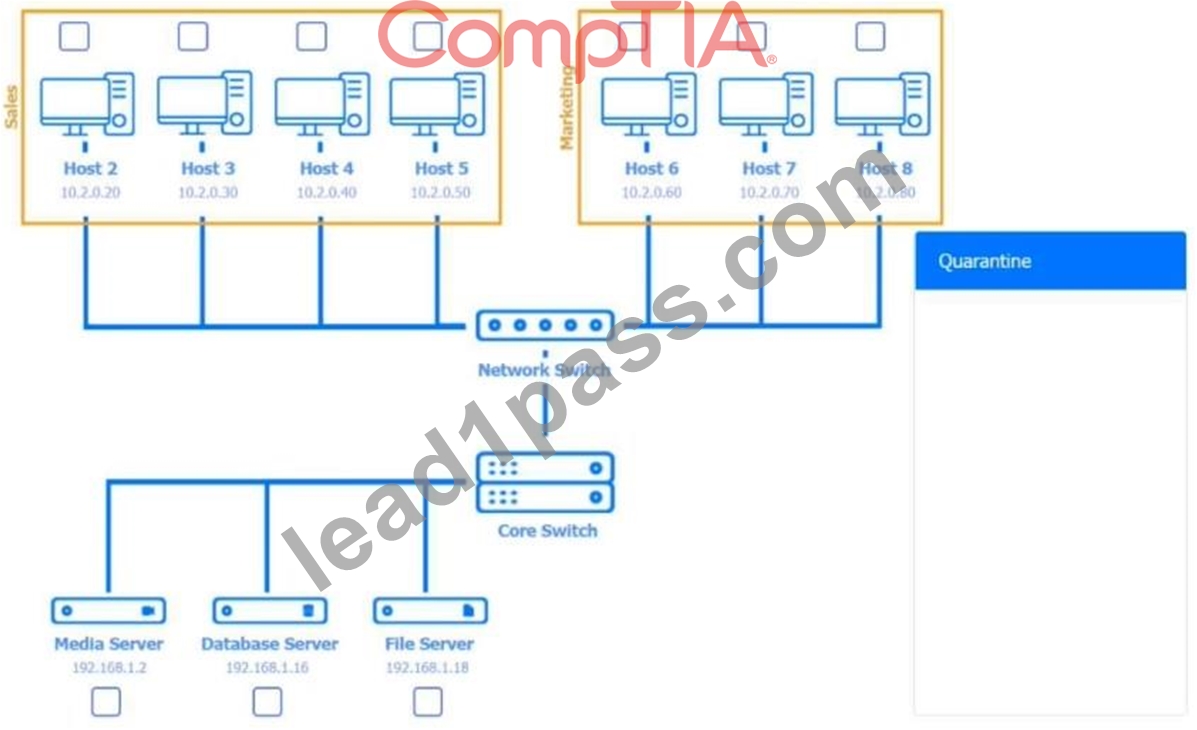










Answer:
Explanation:
See Explanation below for complete solution.
Explanation:
Host 2, Host 3, Host 4 , Host 5 ,Host 6, Host 7, Host 8 , Media Server - Stop All unwanted and malicious service (Persistance.j1zpxn Installer Service) from all the listed host and Media servers Refer screenshot below on the required service started/stopped on host2, same service to be started and stopped across all host servers.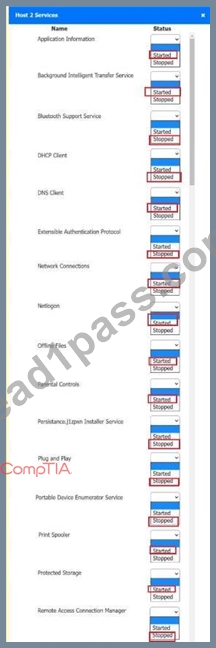
A screenshot of a computer AI-generated content may be incorrect.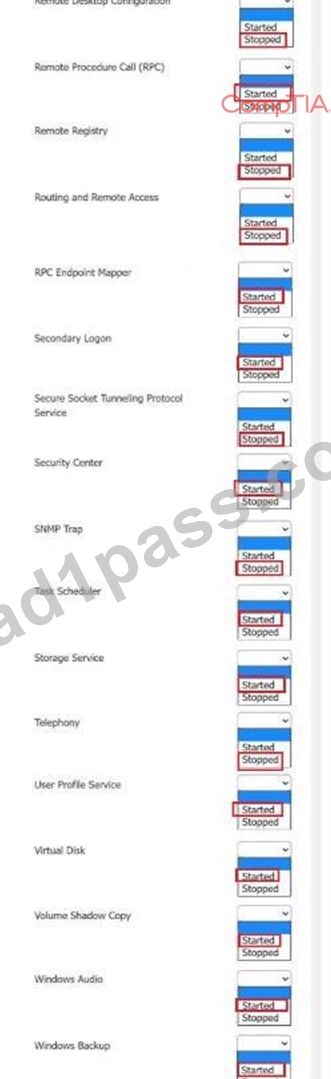
A screenshot of a computer AI-generated content may be incorrect.
NEW QUESTION # 107
A technician needs to disable guest log-ins on domain-joined desktop machines. Which of the following should be used?
- A. MSConfig
- B. Microsoft Management Console
- C. Firewall
- D. Group Policy
Answer: D
Explanation:
Comprehensive and Detailed Explanation From Exact Extract:
Group Policyis the standard administrative tool for setting user permissions across domain-joined systems.
FromQUENTIN DOCTER - COMPLETE Study Guide:
"Use Group Policy to enforce user rights, including disabling guest account access on domain computers."
NEW QUESTION # 108
A user reports that the time on their computer does not match the time on their VoIP phone. What should a technician do?
- A. Download and install the latest BIOS update.
- B. Configure access to an available NTP server.
- C. Confirm the user is logging in to the domain.
- D. Manually set the time on the phone to match the computer.
Answer: B
Explanation:
This scenario involves a mismatch in device time settings, which can affect synchronization and authentication across the network. Using aNetwork Time Protocol (NTP) serverensures all networked devices maintain accurate and synchronized clocks.
FromTravis Everett - All-in-One Exam Guide:
"NTP servers keep all devices on a network in sync. This prevents time drift, which can cause authentication issues with domain logins, certificates, and applications." .
NEW QUESTION # 109
A user switches from Linux to Windows and tries to migrate data using an external USB drive. Windows prompts that the device must be formatted. It works fine on Linux. What should the user do?
- A. Configure Windows firewall to allow data from Linux systems
- B. Apply a firmware update from the PC manufacturer
- C. Update the file allocation system to exFAT
- D. Replace the cable with Windows-supported hardware
Answer: C
Explanation:
Comprehensive and Detailed Explanation From Exact Extract:
Windows doesn't natively support many Linux file systems (like ext4).Reformatting to exFATmakes the drive readable/writable on both Linux and Windows.
FromAll-in-One Exam Guide:
"For cross-platform compatibility, exFAT is recommended as it supports large files and is recognized by Windows, macOS, and Linux (with exFAT drivers)."
NEW QUESTION # 110
Which of the following authentication methods is the best way to prevent users from frequently entering their credentials?
- A. Multifactor authentication
- B. Access control list
- C. Single sign-on
- D. One-time password
Answer: C
Explanation:
Comprehensive and Detailed Explanation From Exact Extract:
Single sign-on (SSO)allows users to authenticate once and gain access to multiple systems without re-entering credentials, which significantly enhances user convenience while maintaining security.
FromQuentin Docter - CompTIA A+ Complete Study Guide:
"Single sign-on streamlines authentication by allowing users to log in once and access all authorized resources, reducing credential fatigue and improving security."
NEW QUESTION # 111
......
Latest 220-1202 Pass Guaranteed Exam Dumps with Accurate & Updated Questions: https://www.lead1pass.com/CompTIA/220-1202-practice-exam-dumps.html
220-1202 Exam Brain Dumps - Study Notes and Theory: https://drive.google.com/open?id=1NYWga3oDy_hlUlof7peQak_ohER03YhR